






In brief
- Open-weight models have trailed the best closed models by an average of four months since January 2026, according to Epoch AI's May 29 analysis.
- Ollama and LM Studio are free, small models need about 8GB of VRAM or Mac unified memory, and LM Studio can operate entirely offline.
- The largest open models, such as Alibaba's 2.4-trillion-parameter Qwen 3.8-Max, sit far beyond consumer hardware, and closed models won 24 of 31 tests in Alibaba's own comparison.
Open-weight AI models now trail the best closed models by only about four months on average, and a growing number of them run on hardware you probably already own.
"Open-weight" means the company publishes the weights, the files holding everything the model learned, so anyone can download and run them. Two free programs, Ollama and LM Studio, handle the rest, and Gemma 4 downloads in Ollama's library range from about 4.6GB to 20GB.
With open models, you don't need to pay $20 a month for an AI subscription or send your conversations to someone else's servers to get a capable chatbot. This guide explains how to download and run AI models directly on your computer, what kind of hardware you'll need, and how to get started with free tools like Ollama and LM Studio.
Whether you want to save money, keep your conversations private, or experiment with AI models you can customize yourself, setting up a local AI assistant may be easier than you think.
Why run an AI model on your own machine
A cloud chatbot sends every prompt to a company's servers, and a court ordered OpenAI to preserve ChatGPT logs, including deleted ones, as Decrypt reported in a review of privacy-focused AI tools. A local model keeps the conversation on your computer and nobody can use it without your permission.
LM Studio's documentation says the app "can operate entirely offline, just make sure to get some model files first," and that documents attached to a chat can be used entirely offline too.
Subscriptions to paid chatbots run about $20 per month, while the software here is free. The cost shifts to hardware you may already have.
Licenses decide what you can do with downloaded weights. DeepSeek's R1 series is under the MIT License, and its model card says the models "support commercial use, allow for any modifications and derivative works," while Google's Gemma 4 and OpenAI's gpt-oss ship under Apache 2.0.
Running models on an open-source license like Apache or MIT means you are free to use, modify, and do whatever you want with a model. This means users are able to access improved and modified versions of a specific model that better fit their needs. Maybe you need a model that is good at medicine, so you don’t care about how good it codes. This level of personalization is only available in customized models.
What your hardware can actually run
Models are sized in parameters, the internal numbers adjusted during training, and the download grows with them. The model has to fit in your graphics card's video memory, known as VRAM, or in a Mac's unified memory, which the processor and graphics chip share.
As a general rule, you'll want at least 8GB of VRAM, that compressed smaller will be able to fit. However, serious users should buy a gaming GPU with 24GB of VRAM or more, either by stacking up GPUs or by buying specific AI racks or machines with unified memory like the Mac Mini or the Nvidia DGX Spark.
Quantization shrinks a model by storing each weight with fewer bits. Hugging Face's documentation describes it as representing weights and activations "with low-precision data types like 8-bit integer (int8) instead of the usual 32-bit floating point (float32)," which cuts memory use at the cost of some accuracy.
LM Studio's system requirements recommend 16GB or more of RAM on Apple Silicon Macs running macOS 14 or newer, though 8GB Macs can handle smaller models. On Windows it recommends at least 16GB of RAM and 4GB of dedicated VRAM, with AVX2 processor support, and Intel-based Macs are not supported.
Ollama's library lists Gemma 4 26B at 16 to 19GB and the 31B version at 19 to 20GB. OpenAI's gpt-oss-20b needs only 16GB of memory, and gpt-oss-120b runs within 80GB, according to OpenAI.
How to set up Ollama and LM Studio
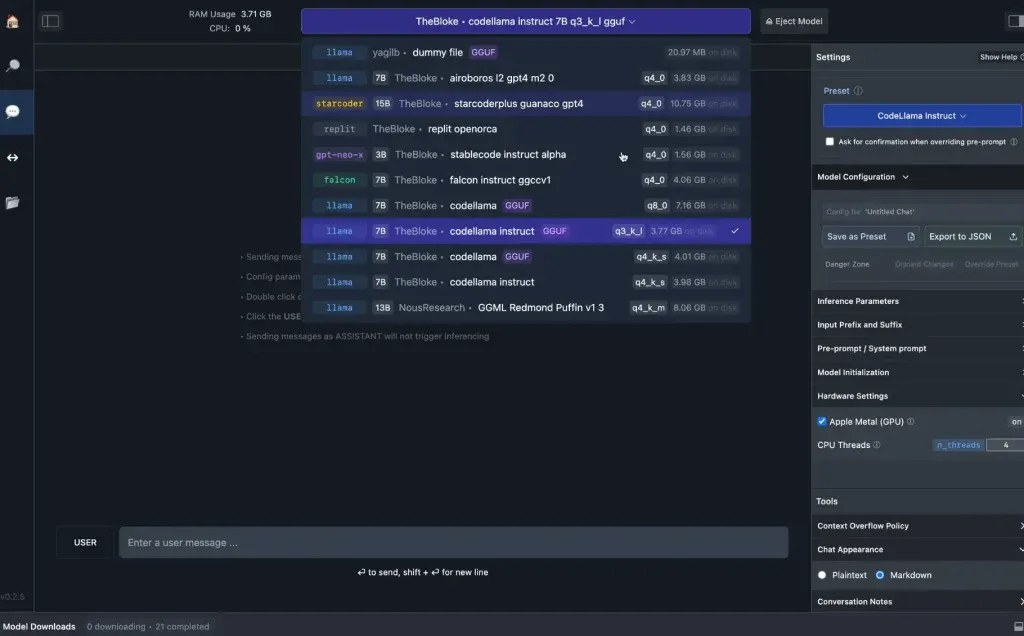
LM Studio is probably the go-to choice because it provides a nice polished graphical user interface. Ollama, on the other hand, is aimed at developers and more experienced users who prefer working inside of a terminal (CLI).
For LM Studio, download the installer for your operating system from lmstudio.ai, search for a model inside the app, download its weights and open a chat. The app searches Hugging Face, the public hub where open models are published.
For Ollama, macOS and Linux users install with the command curl -fsSL https://ollama.com/install.sh | sh, and Windows users run irm https://ollama.com/install.ps1 | iex in PowerShell, both listed on Ollama's download page.
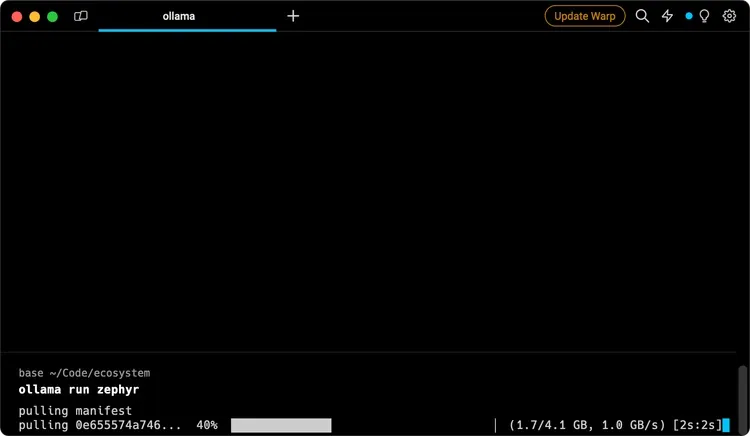
Typing ollama pull gemma4:e2b downloads a model and ollama run gemma4:e2b opens a chat, and /bye exits, per Ollama's quickstart. The program also opens a local API at http://localhost:11434, so other apps on your machine can use the model.
Model names ending in ":cloud," such as gemma4:cloud, are cloud models that run in Ollama's cloud and need no download, so skip those if privacy is the point. That said, this is a good second option for those who need more powerful models: The calls and prompts handled over API are not stored in the providers’ servers, and are not used to train models.
Google's Multi-Token Prediction drafters for Gemma 4, available on Ollama under Apache 2.0, speed up generation by up to 3x using speculative decoding, in which a small model proposes several tokens ahead and the large one checks them together.
Google said that "if the target model agrees with the draft, it accepts the entire sequence in a single forward pass," and the target model adds one extra token of its own in that same pass.
Local models gain web search and file access through MCP servers, short for Model Context Protocol, and LM Studio added support in version 0.3.17, according to the Decrypt guide.
Where local models still lose to the cloud
The four-month average describes the most capable open models, and the largest are far past consumer hardware. Alibaba's Qwen3.8-Max has 2.4 trillion total parameters, with 95 billion active at any time, compared with the 80GB of memory that gpt-oss-120b runs within.
When a model spills out of VRAM into system RAM, responses may be a lot slower, and larger context windows need more memory. Gemma 4's small models offer a 128K-token context window, the amount of text a model can consider at once, and the larger ones 256K.
Cloud services need none of that planning, and the frontier models behind them still lead on the hardest tests.
If you want to use AI privately, our own review recommended "xPrivo with a self-hosted local model for day-to-day drafting that must not leave your machine," and Kagi "when you need web retrieval and accept the API call tradeoff."
Daily Debrief Newsletter
Start every day with the top news stories right now, plus original features, a podcast, videos and more.
Join 72,000+ readers